What the Registration Camera Kit does on the line
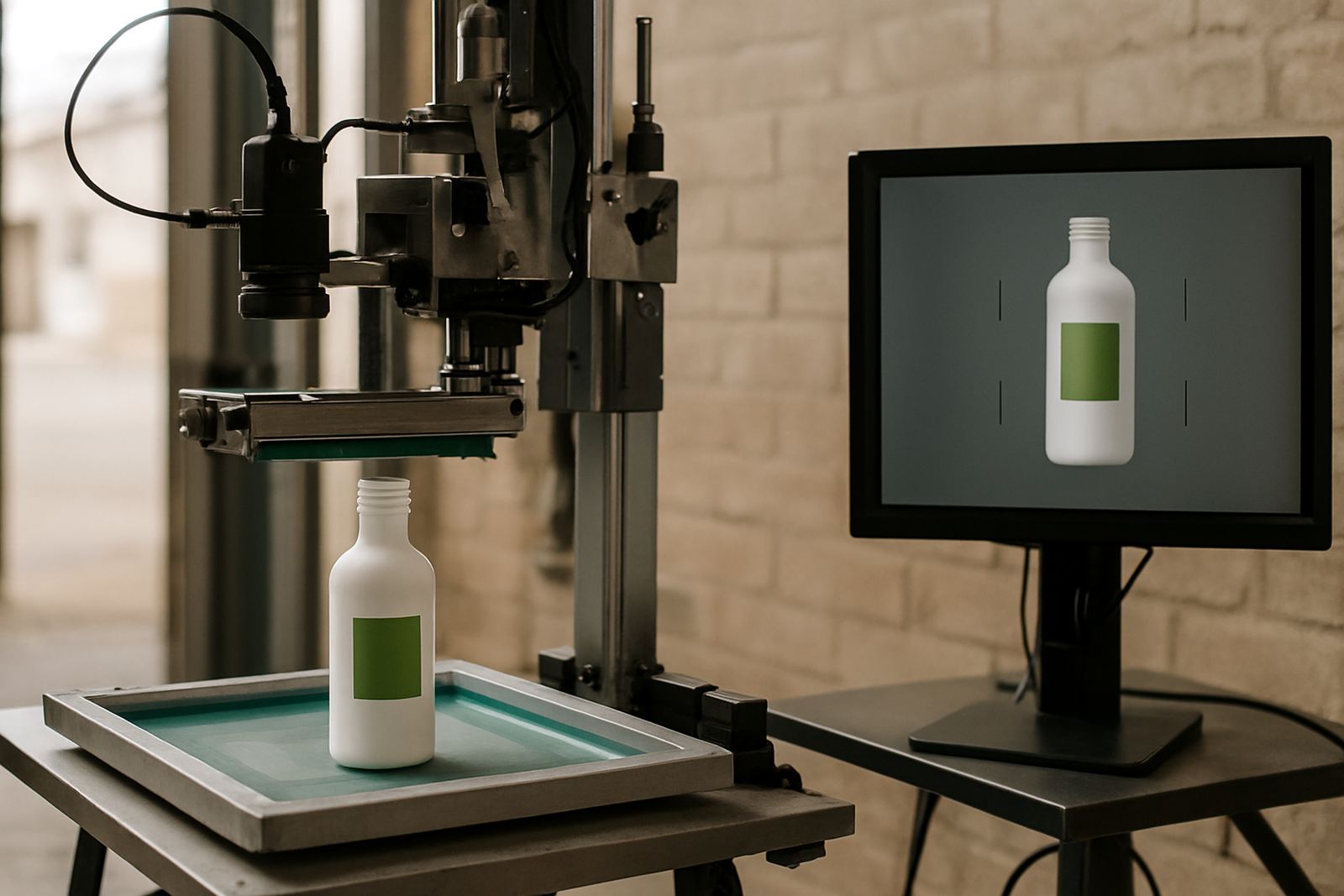
The Registration Camera Kit is a visual alignment tool used to check position before a run starts and to confirm repeat placement during production. It helps an operator see where the print sits on the container, so artwork, logos and text can be kept in the same position from one batch to the next. For shops doing short runs for promotions or longer runs for retail packaging, that sort of repeatability matters a lot.
It is commonly used with cylindrical screen-printing machines for glass bottles, PET bottles, plastic cups, aluminium containers and straight or slightly tapered tubes. The kit is especially useful when the job has a fine logo, a small neck band, or a multi-colour layout that needs a steady hand. It does not replace proper setup, but it makes setup faster and more accurate, which saves ink, screens and time.
On production floors in Johannesburg, Pretoria, Durban and Cape Town, we often see the kit used where operators need to keep the same artwork position across several shifts. That helps when staff rotate or when the same job comes back weeks later. For a business doing repeat orders, the extra control is usually worth it.
Sizes and options for different containers
The kit is supplied in practical configurations to suit the most common container diameters and line layouts. The camera assembly is typically mounted on a rigid bracket, with a viewing field set for the print zone on small and medium containers. If the line handles mixed bottle sizes, a movable mount or adjustable stand may be the better option. We can advise on the best fit once you share the container dimensions.
- Standard kit for small to medium bottles and cups
- Adjustable mount for mixed diameter runs
- Extended bracket for deeper print zones
- Positioning aid for single colour or multi-colour setups
- Optional marker reference scale for quick job resets
The right option depends on the container diameter, print height, and how often the line changes jobs. If your production is mostly one size, a fixed setup may be simplest. If you move between 250 ml cups, 330 ml bottles and tubes, an adjustable arrangement is usually easier to live with, especially when the team is working under time pressure.
Where it suits best in South African production
This kit suits packaging and decoration businesses that need neat, repeated placement rather than loose visual checking. It is useful for contract decorators, drink bottlers, cosmetic packers, pharmaceutical tube printers and branded merchandise producers. In smaller shops, one good registration aid can cut the time spent on trial prints and keep the operator from chasing position by eye for too long.
It also helps in plants where lighting changes during the day or where staff are dealing with load-shedding and generator changeovers. A clear visual reference can save a lot of rework when power comes back and the line is restarted. In coastal areas such as Durban and Cape Town, where humidity can affect handling and drying, a steadier setup also helps reduce smudging and off-centre prints.
- Branding on reusable bottles and drinkware
- Cosmetic and personal care tubes
- Promotional items with repeat artwork
- Short-run contract printing
- Production lines needing quick job resets
Installation, power and line setup
The Registration Camera Kit is normally fitted as part of a proper machine setup rather than treated as an add-on at random. Alignment depends on the print station, the container hold position and how the operator views the mark. For best results, the unit should be mounted securely, then checked with live samples before production starts. We recommend allowing time for the first setup so the reference points are set correctly.
Most kits need a stable mount and a clean line of sight to the print area. Power requirements are generally low, but you still need a reliable electrical supply and a tidy cable route. On sites with voltage dips or generator changeovers, a small power conditioner or protected supply is a sensible idea. There is no gas requirement for this kit. If the line includes curing or drying equipment, that is a separate matter and should be planned around the full production line, not just the camera unit.
For sites in Aeroton, Johannesburg South and Midrand, we often plan the installation alongside operator training so the team can use the kit properly from day one. That saves time later when the first repeat order comes in and the job must match the sample exactly.
Care, cleaning and servicing over time
Like any line aid, the kit works best when it is kept clean and checked regularly. Dust, ink mist and handling marks can build up on lenses, covers and reference surfaces. Wipe the viewing area with a soft lint-free cloth and avoid harsh solvents unless the surface is rated for them. If the unit is moved between jobs, check that the mount is still square before the next run starts.
We suggest a basic weekly check on fasteners, cable condition and image clarity, plus a more thorough inspection during scheduled maintenance. In busy shops, a small vibration or loose bracket can throw off repeat placement quicker than people expect, especially on longer runs. If the unit is part of a line that sees frequent screen changes or screen reclaiming work, keep the registration reference points recorded with the job notes.
- Clean viewing surfaces with non-abrasive cloths
- Check mount tension and bracket alignment
- Inspect cabling after line moves or cleaning
- Record settings for repeat orders
- Reconfirm position after power interruptions
What to check before ordering
Before placing an order, it helps to have a few job details ready. The more accurate the container information, the easier it is to supply the right kit and avoid delays. Measure the container diameter, print area height and the distance from the support point to the artwork position. If you work with several container sizes, tell us the smallest and largest units in use so we can advise on adjustment range.
You should also confirm whether the line is manual, semi-automatic or fully automatic, and whether the team needs quick changeover between different products. If the machines are used for high-volume work, ask about spares and service intervals at the same time. That way the kit can be planned with the rest of the production setup, not after the fact. A clean spec sheet and a few sample containers usually make the process quicker, and less back and forth.
We also recommend noting any site limits such as floor space, available lighting, dust levels and the type of electrical supply on hand. For businesses operating under municipal noise or layout rules, or in shared industrial premises, those practical details can affect where the kit is mounted and how easy it is to service later.
Key facts
| Product type | Visual registration and alignment kit for cylindrical print setup |
|---|---|
| Compatible containers | Bottles, cups and tubes |
| Typical use | Repeat-run alignment, setup checks and artwork positioning |
| Mounting | Rigid bracket or adjustable support, depending on line layout |
| Power needs | Low electrical supply required, no gas connection |
| Best suited for | Manual, semi-automatic and production print lines |
| Support | Installation, operator training, maintenance and setup assistance |